


Marine App for Fuel Consumption
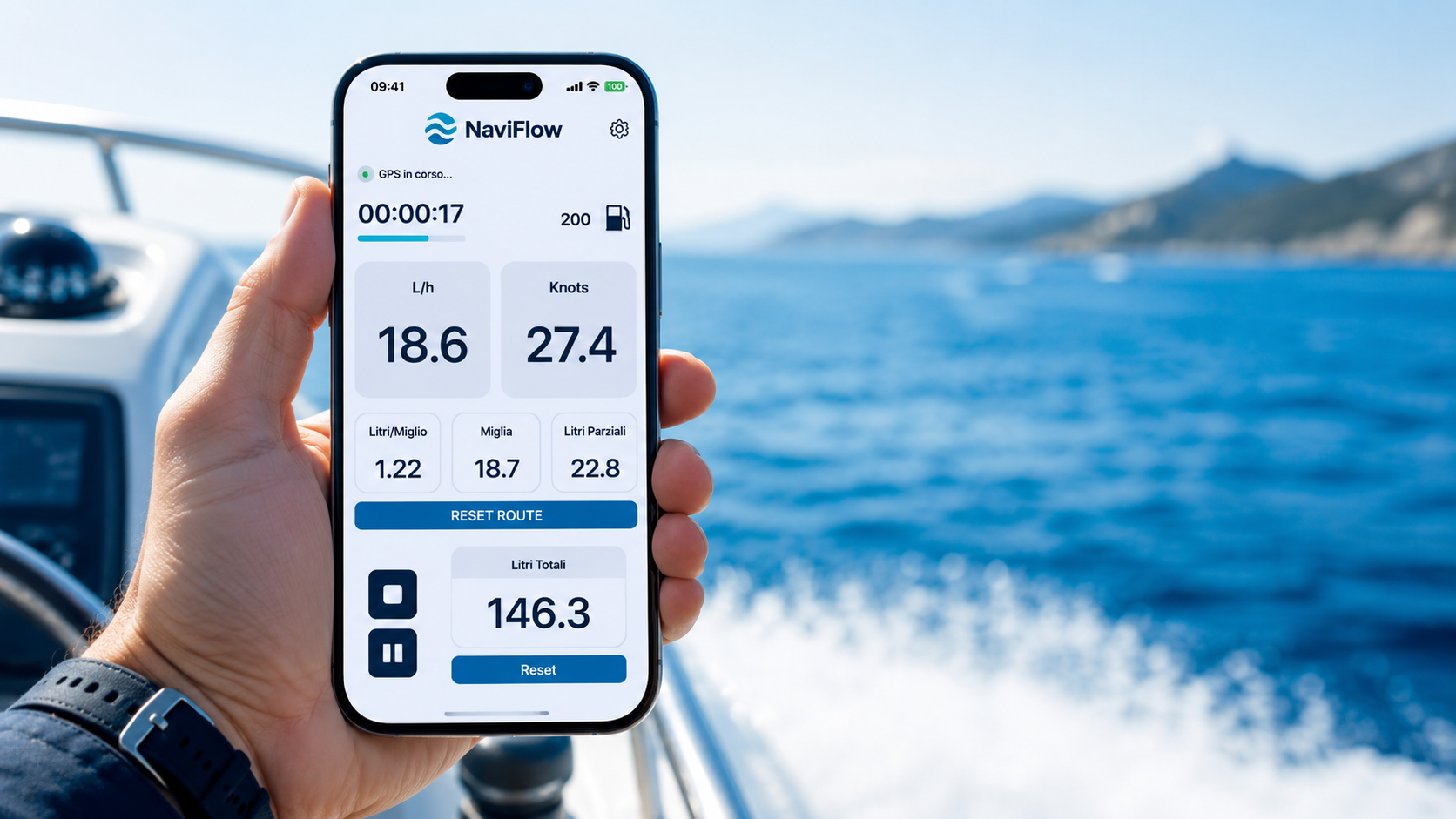
The NaviFlow App is free and is available for both iOS and Android. Even in its basic version, it allows you to use the NaviFlow system in a simple and immediate way to monitor your boat’s fuel consumption, with an intuitive interface and a configuration suitable even for users without specific technical skills.
For those who want even more complete control while cruising, it is possible to subscribe to a premium plan that unlocks additional useful features, designed to make fuel consumption readings even more accurate and route management even more convenient. With the subscription, you can display instant litres per nautical mile, save more than 10 routes, use the navigation screen in landscape mode and pause a route whenever necessary.
The subscription costs €39.99 for 6 months or €14.99 for 1 month. This allows each user to choose the plan that best suits their needs, depending on how often they go boating and how much data they want to view and save over time.
No more improvised calculations, often wrong and inaccurate. No more scraps of paper or mathematical formulas used badly and at random. With the NaviFlow system and App, you simply enter the correct data, without difficulty and without needing a degree in computer science, to obtain the instant fuel consumption of a boat with a single engine or twin engines, diesel or petrol. With just a few clicks, you can reduce range anxiety and obtain a more accurate estimate of fuel consumption and navigation costs.
The NaviFlow App was created precisely to transform complex technical data into information that is simple to read and useful in practice. The goal is to give boat owners an immediate tool to monitor engine consumption, improve the efficiency of the boat and make more informed decisions during every trip at sea.
What is needed to install the system?
Simply connect the NaviFlow control unit to a 12 or 24 V power supply, connect the flow meter to the fuel line and download the NaviFlow App. The system has been designed to be quick and easy to set up, without invasive installation on the console and without complex procedures.
The tutorial summarises and explains the installation in a few simple steps at the following link. In just a few minutes, you can understand the general operation of the system and see how the App communicates with the control unit to display navigation and fuel consumption data in real time.
A stable Bluetooth connection
The connection is provided by Bluetooth Low Energy, different from classic Bluetooth and known as BLE. It is still a wireless technology, but with lower energy consumption and reduced cost, essential features for those who go boating and may not always have a charging socket available. The ability to keep fuel consumption under control goes hand in hand with the guarantee of a stable connection, without losing quality in data transmission.
The advantages of the Bluetooth Low Energy protocol are clear: low power requirement for activation and operation, reduced energy consumption and compatibility with most devices such as smartphones, tablets and PCs. The NaviFlow App uses version 4.1, also adopted in areas such as home automation and ideal for marine applications where reliability, simplicity and continuous communication are required.
This means that the system remains efficient even during long trips at sea, allowing the smartphone to receive data continuously without significantly affecting the device’s battery.
Ease of use and real-time consumption
The App is intuitive and avoids traditional pairing: pairing with the device is not required because the connection is managed through the App and not through the operating system. Everything happens automatically and in real time. NaviFlow calculates directly on the basis of the actual fuel flow measured by the flow meter, and the data is sent to the smartphone through the BLE protocol. A direct and constant control.
Configuration is very simple. When the App is launched, the initial screen shows the available control units. In just a few moments, you can connect, rename the control unit with the boat’s name and enter the password, corresponding to the last four digits of the serial number shown on the control unit and on the box.
Once the initial configuration is complete, the user can immediately access the essential data for navigation. The reading is clear, immediate and suitable even for those who are not familiar with advanced technical instruments. Everything is designed to provide the information that is truly useful when it is needed.
With NaviFlow, consumption is not estimated approximately, but calculated on the basis of the actual fuel flow in the circuit. This makes the data much more reliable and allows you to concretely evaluate the effect of speed, trim and engine configuration on final fuel consumption.
Consumption history and data memory
The consumption history, including litres used and remaining fuel in the tank, is saved in memory. This means that even if the control unit is switched off, the next time it is started the App will show the previous values without the need to enter everything again.
This data will remain in memory until the user resets it, which can also be done once a year. This feature is particularly useful for those who want to keep a reliable consumption history over time and check the differences between one boating season and another.
Having persistent data memory means being able to rely on a truly useful tool in the medium and long term. It is not only about seeing current consumption, but also about reconstructing the overall use of the boat and analysing fuel cost trends over time.
Saving completed routes
A very useful feature offered by the NaviFlow App is the route history. With one click, you can view all the routes saved in memory, which can also be easily consulted on Google Maps. In an instant, you have all the key information: navigation duration with departure and arrival, miles travelled and the cost of fuel consumed.
Configuration is simple: just enter the fuel price and the tank volume in litres. These are easy data to set, but extremely useful for obtaining a clear and immediate reading of the real cost of every trip at sea.
The interface has been designed to be friendly and highly usable, so that the information is readable and understandable for everyone. The result is a clean, organised and practical screen, where the main data is always under control.
With the free version of the App, it is possible to save up to 10 routes. For those who go boating often or want to keep a wider history, the subscription allows this limit to be exceeded and a greater number of routes to be stored, maintaining a more complete overview of the boating season.
If the boat is equipped with twin engines, separate icons for the two engines appear, showing instant consumption parameters in litres per hour based on speed in knots. The display can also be used in landscape mode: the smartphone screen can be rotated for optimal viewing, a particularly useful feature while cruising.
Price and subscription
The NaviFlow App is free and already in its basic version offers useful tools to monitor consumption and view the main navigation data. However, for those who want to take full advantage of the system’s potential, a subscription is available with advanced features.
- Real-time litres per nautical mile
- Possibility to save more than 10 routes
- Navigation screen available in landscape mode
- Possibility to pause the route
The subscription costs €39.99 for 6 months or €14.99 for 1 month. It is a reasonable expense that can easily be recovered thanks to the savings obtained by optimising fuel consumption. In addition, it provides the peace of mind of always keeping range, costs and operating anomalies under control, helping to avoid unexpected problems and unpleasant situations during navigation.